
Pillar Slim — operating instructions
Article contents
This guide describes the original configuration without TouchPoint. For the touchscreen terminal, use the TouchPoint guide. Check parameters and the interface against the supplied configuration's documentation.
1. Introduction
Thank you for purchasing AgeVolt Pillar Slim. This document provides the information needed to use the charging station for your electric vehicles (EVs).
- Keep the user manual throughout the product's lifetime and make it available to charging station users.
- Some station images in this manual are illustrative; the actual product may differ from the one you use.
- Images and instructions refer to a typical device design.
- Your station may differ in design and supported functions.
- Follow this manual's instructions. Failure to do so may create hazards or disable station safety features. Also observe safety precautions and accident-prevention measures appropriate to the situation.
- Charging points (EVSEs) are exclusively for charging electric vehicles. Connecting other devices, such as power tools, is prohibited.
- Follow the operating procedures and safety instructions in this manual.
- Failure to follow safety instructions can endanger life, cause injury or damage equipment!
- The manufacturer accepts no liability for damage or injuries caused by failure to follow the user manual!
1.2 Safety instructions and warning symbols
- Use the station only in perfect condition, with no visible damage. If in doubt, contact AgeVolt technical support.
- Only authorized, qualified professionals should repair or maintain the station. Unauthorized repair or modification voids the manufacturer's warranty.
- Unauthorized modifications or conversions are prohibited.
- Do not remove labels, including safety symbols, warnings, power ratings, identification labels or cable labels.
- Protect the charging station from impacts.
- The station has no built-in switch. Always follow local rules and regulations for operating and using electrical equipment.
- Use the station only within its specified operating parameters and ambient temperatures from −30°C to +50°C.
- Do not use the station in adverse weather that could affect the vehicle or station. Do not open station covers in rain.
- Warning symbols relating to potential hazards appear throughout the user manual.
The warning symbols have the following meanings:
 Danger indicates an immediately hazardous situation that could cause death or serious injury if recommended measures are not followed.
 Caution indicates that failure to follow recommended precautions may damage equipment.
- AgeVolt permits only routine station maintenance: cleaning and inspection by an electrical inspection technician.
- Any other manipulation of the charging station voids its warranty.
- Do not remove manufacturer seals. Removal invalidates warranty entitlement.
2. Charging station description
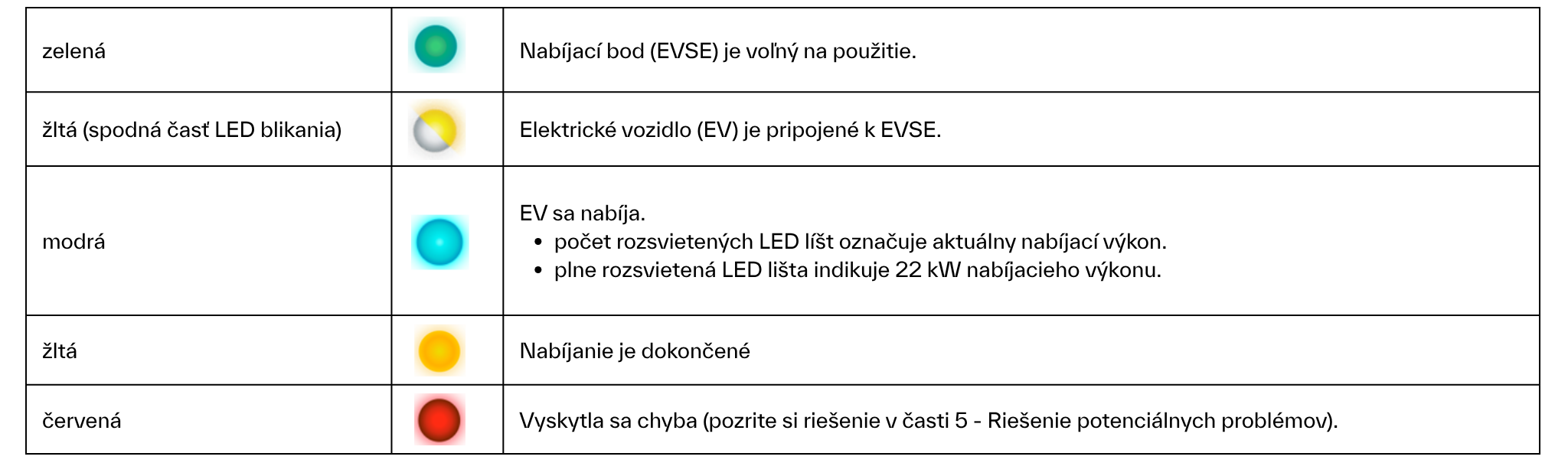
The station has two LED strips, each representing the charging point on the same side. If the station has only one EVSE, both strips show its status.
LED status description:
2.2 Display and RFID
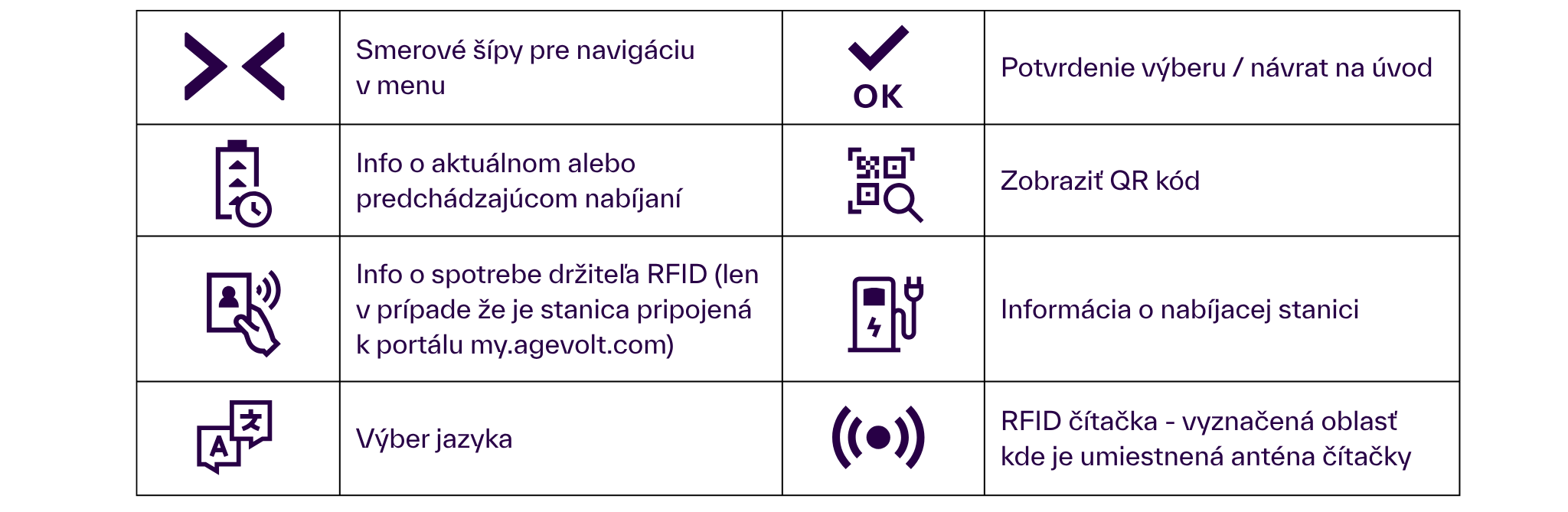
The display shows EVSE status before and during charging and instructs users to perform actions. Charging power, duration, price and other information are also available. An RFID reader at the display's top authorizes users through cards, key fobs, wristbands and similar devices.
 2.3 Acoustic signals
- A tone sounds when a display button is pressed
- A tone sounds when an RFID device is recognized
2.4 Technical nameplate
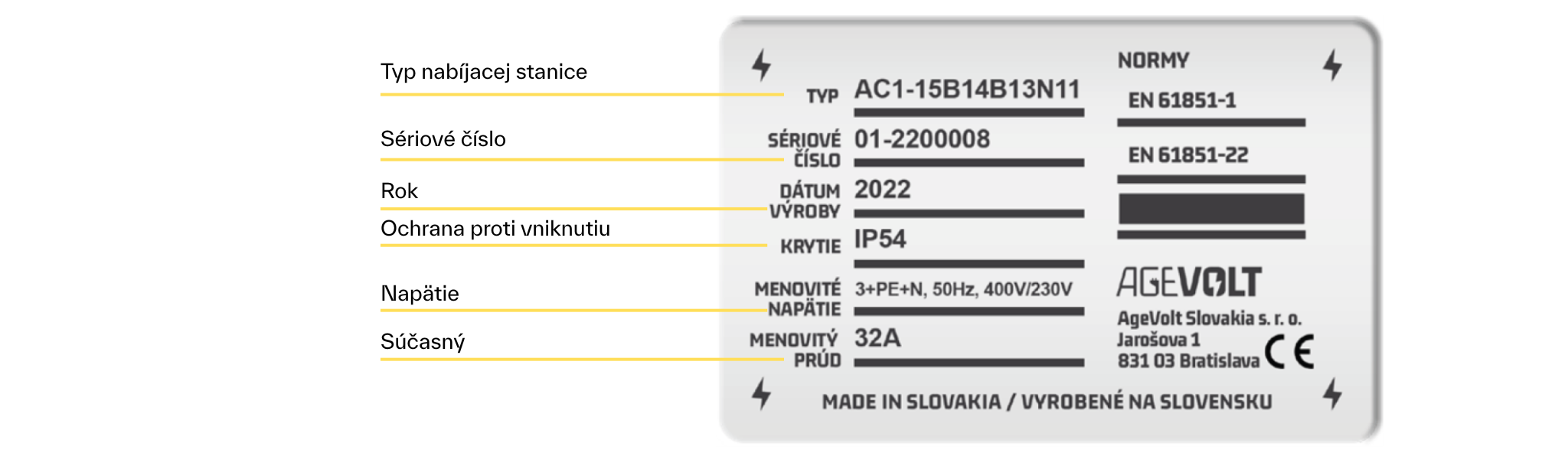
The technical nameplate is inside the Pillar Slim cover and contains relevant technical information. Do not remove it.
3. Authorization
The authorization type depends on settings made during installation and configuration.
3.1 No authorization: unrestricted access
- No authorization is required to use the charging station.
- Authorization requires an RFID tag, such as a key fob or card, stored in the station's SmartSystem.
- Authorization requires registration in the AgeVolt portal/mobile application
- Use https://my.agevolt.com/ to register and create an account, following the registration portal's instructions.
- Use NFC, the QR code or the label next to the EVSE to identify the station more easily.
4. Electric vehicle charging process
Follow these steps and observe the corresponding LED and display actions
Initial state
- The LED strip is green
- The display shows “Charging point VOĽNÁ - RFID (AVAILABLE - RFID)” if the charging station requires authorization
- The display shows “Charging point VOĽNÁ - free (AVAILABLE - free)” if the station does not require authorization
1. Connect the EV to the station.
- The lower LED strip section flashes yellow.
- The display shows “EV connected"
2. Authorization, if required by the station.
2.1 Present the RFID device to the reader; RFID card users only.
- A beep sounds.
- The LED strip flashes blue.
- The display shows “Preparation".
2.2 Select the station in the AgeVolt portal and press Start charging; AgeVolt portal users only.
- Find the station by its label or scan its QR code/NFC tag.
- The LED strip is blue and slowly moves downward.
- The DISPLAY shows “Pripojte auto (Connect the car)".
3. Charging starts automatically.
- The LED strip becomes blue and initially rises slowly until maximum available power is reached.
- The display shows “Charging".
4.2 Ending charging (after the EV battery is fully charged)
Initial state
- The LED strip is yellow.
- The DISPLAY shows “Nabité (Charged)".
1. Disconnect the EV cable from the station.
Initial state
- The LED strip is blue, according to current charging power.
The DISPLAY shows “ Charging".
Stop charging by unlocking the car*.
- The LED strip is blue and slowly moves downward.
- The DISPLAY shows “ Charging” and falls to 0 kW.
2. Disconnect the cable from the EV and station.
- The LED strip becomes green.
*Unlocking the car pauses charging for a few seconds while the cable is disconnected. If you do not disconnect it, charging resumes automatically. If charging does not resume, the station ends the charging process.
5. Resolving possible problems
5.1 Possible problems and solutions
|
Error |
Possible causes |
Solution |
|
EV connected to the station | ||
|
Charging did not start.
|
A charging process step was not followed or was skipped. |
Disconnect the cable from the car and station, wait 10 seconds, then start charging again. |
|
The LED does not change from green to yellow. |
The charging cable is damaged. |
Replace the charging cable. |
|
Display | ||
|
Shows “HALT”. |
A software update is in progress.
|
Wait for the update to finish.
|
|
The display is not communicating with the control system.
|
1. Restart the charging station by switching power off and on. 2. Contact technical support. | |
|
Does not respond when an RFID card is presented.
|
The card is not supported.
|
Replace it with a supported card type.
|
|
The RFID reader is not working correctly.
|
1. Restart the charging station by switching power off and on. 2. Contact technical support. | |
|
Shows an unreadable group of characters.
|
The display is not working correctly.
|
Restart the charging station by switching power off and on.
|
|
LED | ||
|
Lights red. |
Charging station fault. |
1. Restart the charging station by cycling power. 2. Contact technical support. |
5.2 Checking a charging point — professional intervention
If a charging point fails, ordinary users must not open the station. Contact the helpdesk or site's technical contact. Checking protective devices and resetting the RCBO must be performed by a qualified technician after assessing the fault's cause.
Original procedure for a qualified technician
This procedure describes the original station configuration. Before intervention, follow safe-working requirements and the specific servicing instructions.
5.2 Checking the charging point
If the EVSE does not work, check the protective devices.
- Open the rear station cover.
- Check/raise the protective-device (RCBO) lever to the upward position.
- Close the cover again.
5.3 Restarting the charging station
Disconnecting and reconnecting power restarts the station. If the control unit is in the building's distribution board, switching its upstream circuit breaker off and on is sufficient.
6. Charging station specifications
|
Standard design | |
|
Overall dimensions 120 × 1475 × 100 mm |
Weight 15 kg |
|
Number of charging points (EVSE) 2 |
Operating temperature -30°C to +50°C |
|
EVSE socket version: TYPE 2 Mennekes socket (IEC62196-2) |
Operating humidity 5% to 95% |
|
EVSE cable version: 5 m TYPE 2 Mennekes cable (IEC62196-2) |
Storage temperature -30°C to +60°C |
|
Maximum EVSE power 22 kW |
Surface material Steel |
|
Rated voltage 3 × 400/230 V AC, 24 V DC |
Internal access Rear cover |
|
Rated current 63 A |
Protocol: OCPP-J 1.6 |
|
Rated frequency 50 Hz |
Status indication 2x LED strip |
|
Ingress protection rating IP54 |
Electricity meter MID class 1 |
|
Mechanical impact resistance IK10 |
DC protection RCD DC 6 mA |
|
Optional accessories and components, which may not be included with the purchased station |
|
Smart system |
|
Power control with SmartMeter only — dynamic control based on available capacity |
|
Wired internet connection: 10/100 BaseTX (TCPIP) — Ethernet RJ45 |
|
Wireless internet connection: LTE/3G, Wi-Fi |
|
|
|
Smart Meter — requires Smart system |
|
Current sensors and electricity meters — fuse-load monitoring (50–2400 A) |
|
Internal protection |
|
Protective device — circuit breaker and residual-current protection B/32 A, 30 mA, 3+N, Type A, 6 kA |
|
Display with RFID card reader — requires Smart system |
|
Information display: 3-line multilingual LCD and touchscreen |
|
RFID reader: 13.56 MHz (ISO14443A, |
|
Wireless connection — requires Smart system |
|
4G/3G network connection |
7. Maintenance, repairs and care
7.1 Maintenance
The station requires minimal maintenance. AgeVolt recommends regular electrical inspections according to local requirements by an authorized, qualified professional, particularly for public stations. Owners should visually inspect it regularly and maintain good operating condition to prevent damage, faults or accidents.
7.2 Repairs
Unauthorized station repairs are prohibited. Repairs should be performed only by a qualified electrician using original AgeVolt-approved spare parts.
7.3 Cleaning
If required, clean the charging station only with a dry cloth. Disconnect power while cleaning to avoid electric shock. Do not use a pressure washer or aggressive cleaning agents.
8. Abbreviations
AC — alternating current
EVSE — electric vehicle supply equipment/charging point
EV — electric vehicle
RFID — radio-frequency identification
RCBO — residual-current circuit breaker with overcurrent protection
NS — charging station
Text © AgeVolt Slovakia, s.r.o. 2024
Image © AgeVolt Slovakia, s.r.o. 2024
This manual is protected by copyright. Use without the creator's consent is prohibited. Copying, including partial copying, requires their permission.
www.agevolt.com